
I have been looking for existing solutions for a Rust equivalent of FastAPI — building APIs with the type safety and the convenience of auto-generated API docs with OpenAPI.
And after searching all over the internet, I have found utoipa. Currently, I am most familiar with the Axum web framework when building APIs in Rust.
So in this blog post, I'll show you how to create a simple API with axum and utoipa.
Preparing your project§
Run the following commands to initialise a new Rust project
cargo new axum-api
cd axum-api
Let's add the dependencies
cargo add tokio -F full
cargo add serde -F derive
cargo add serde_json
cargo add axum
cargo add utoipa-swagger-ui -F axum
cargo add utoipa-axum
cargo add utoipa
What this project does§
This project will just do simple CRUD operations and have the following endpoints
- POST /items/create
- GET /items/{id}
- DELETE /items/{id}
We can have an SQLite database or some kind of storage we can use to simulate CRUD. But I'll just be lazy and use a dashmap. Hence, adding a new dependency.
cargo add dashmap -F serde
cargo add rand  # To generate random ids
Creating our types§
Let's create our types. Here, we have Item and ItemBucket
use dashmap::DashMap;
use serde::Deserialize;
use serde::Serialize;

#[derive(Debug, Serialize, Deserialize, utoipa::ToSchema, Clone)]
struct Item {
    pub size: usize,
    pub name: String,
}

type ItemBucket = Arc<DashMap<u64, Item>>;
The ItemBucket uses Arc or atomic reference counted to allow sharing ownership of the data. The data is of type DashMap<u64, Item>> which is just a wrapper for HashMap<u64<Item>> as Dashmap<T> is a direct replacement of RwLock<HashMap<T>>. Thus, we can set a new type for shared "app state" or API state to "store" data.
#[derive(Default)]
struct AppState {
    bucket: ItemBucket,
}
Building our API endpoints§
Here are the following methods for our POST, GET, and DELETE endpoints
#[utoipa::path(post,path= "/create", responses((status = OK, body = Item)))]
async fn create_item(Extension(app_state): Extension<Arc<AppState>>) -> impl IntoResponse {
    let id: u64 = random();
    let name = generate_random_string(10);
    let size = name.capacity();
    let item = Item { size, name };
    app_state.bucket.insert(id, item.clone());
    Json((id, item))
}

#[utoipa::path(get, path="/{id}", responses((status=OK, body=(u64, Option<Item>))))]
async fn get_item(
    Path(id): Path<u64>,
    Extension(app_state): Extension<Arc<AppState>>,
) -> impl IntoResponse {
    let maybe_item = app_state.bucket.get(&id);
    let item = maybe_item.map(|v| v.clone());
    Json((id, item))
}

#[utoipa::path(delete, path="/{id}", responses((status=OK, body=(u64, Option<Item>))))]
async fn delete_item(
    Path(id): Path<u64>,
    Extension(app_state): Extension<Arc<AppState>>,
) -> impl IntoResponse {
    let maybe_item = app_state.bucket.remove(&id);
    let item = maybe_item.map(|(_, v)| v.clone());
    Json((id, item))
}
And here is the core logic of our main function
use axum::Extension;
use axum::Json;
use axum::Router;
use axum::extract::Path;
use axum::response::IntoResponse;
use rand::prelude::*;
use std::sync::Arc;
use utoipa::openapi::OpenApiBuilder;
use utoipa_axum::router::OpenApiRouter;
use utoipa_axum::routes;

use dashmap::DashMap;
use rand::random;
use serde::Deserialize;
use serde::Serialize;
use utoipa_swagger_ui::SwaggerUi;

/*
...our other code here
*/

#[tokio::main]
async fn main() {
    let app_state = Extension(Arc::new(AppState::default()));

    let (app, api) = OpenApiRouter::new()
        .routes(routes!(create_item))
        .routes(routes!(get_item))
        .routes(routes!(delete_item))
        .layer(app_state.clone())
        .split_for_parts();
    let open_api_builder = OpenApiBuilder::new().build().nest("/items", api);

    let url = "localhost:3000";
    let listener = tokio::net::TcpListener::bind(&url).await.unwrap();
    let swagger_docs = SwaggerUi::new("/docs").url("/api-docs/openapi.json", open_api_builder);
    let app = Router::new().nest("/items", app).merge(swagger_docs);
    axum::serve(listener, app).await.unwrap();
}
We use the following declaration
    let (app, api) = OpenApiRouter::new()
        .routes(routes!(create_item))
        .routes(routes!(get_item))
        .routes(routes!(delete_item))
        .layer(app_state.clone())
        .split_for_parts();
to create an axum router called app and OpenAPI information called api which is passed to OpenApiBuilder. We used .nest method on the OpenApiBuilder so our endpoints will start with the route path /items.
Honestly, my only issue currently with the SwaggerUi initialisation is the hard-coded /api-docs/openapi.json. It causes some path issues if the variable is merged incorrectly into the router e.g.
let app = Router::new().nest("/items", app.merge(swagger_docs));One would expect that /items/docs is the path to the OpenAPI documentation which is correct, but because of the .url method, you would also expect that it automatically points to /items/api-docs/openapi.json... which does not. Thus, the example gives confusion and only shows up if you edit the path by prepending /items/ in the search bar. For now, my only workaround and safer bet is to ensure that /docs should be at the top-level path of the URL so we merge it giving the complete URL to be localhost:3000/docs while also ensuring that our /api-docs are also at the top-level path next to the root /, hence, pointing to the correct openapi.json data.
Testing our API§
Here is the fullcode of the API (click to toggle dropdown)
use axum::Extension;
use axum::Json;
use axum::Router;
use axum::extract::Path;
use axum::response::IntoResponse;
use rand::prelude::*;
use std::sync::Arc;
use utoipa::openapi::OpenApiBuilder;
use utoipa_axum::router::OpenApiRouter;
use utoipa_axum::routes;

use dashmap::DashMap;
use rand::random;
use serde::Deserialize;
use serde::Serialize;
use utoipa_swagger_ui::SwaggerUi;

#[derive(Debug, Serialize, Deserialize, utoipa::ToSchema, Clone)]
struct Item {
    pub size: usize,
    pub name: String,
}

type ItemBucket = Arc<DashMap<u64, Item>>;

#[derive(Default)]
struct AppState {
    bucket: ItemBucket,
}

fn generate_random_string(length: usize) -> String {
    const CHARSET: &[u8; 62] = b"ABCDEFGHIJKLMNOPQRSTUVWXYZabcdefghijklmnopqrstuvwxyz0123456789";
    let mut rng = rand::rng();

    (0..length)
        .map(|_| {
            let idx = rng.random_range(0..CHARSET.len());
            CHARSET[idx] as char
        })
        .collect()
}

#[utoipa::path(post,path= "/create", responses((status = OK, body = (u64, Item))))]
async fn create_item(Extension(app_state): Extension<Arc<AppState>>) -> impl IntoResponse {
    let id: u64 = random();
    let name = generate_random_string(10);
    let size = name.capacity();
    let item = Item { size, name };
    app_state.bucket.insert(id, item.clone());
    Json((id, item))
}

#[utoipa::path(get, path="/{id}", responses((status=OK, body=(u64, Option<Item>))))]
async fn get_item(
    Path(id): Path<u64>,
    Extension(app_state): Extension<Arc<AppState>>,
) -> impl IntoResponse {
    let maybe_item = app_state.bucket.get(&id);
    let item = maybe_item.map(|v| v.clone());
    Json((id, item))
}

#[utoipa::path(delete, path="/{id}", responses((status=OK, body=(u64, Option<Item>))))]
async fn delete_item(
    Path(id): Path<u64>,
    Extension(app_state): Extension<Arc<AppState>>,
) -> impl IntoResponse {
    let maybe_item = app_state.bucket.remove(&id);
    let item = maybe_item.map(|(_, v)| v.clone());
    Json((id, item))
}

#[tokio::main]
async fn main() {
    let app_state = Extension(Arc::new(AppState::default()));

    let (app, api) = OpenApiRouter::new()
        .routes(routes!(create_item))
        .routes(routes!(get_item))
        .routes(routes!(delete_item))
        .layer(app_state.clone())
        .split_for_parts();
    let open_api_builder = OpenApiBuilder::new().build().nest("/items", api);

    let url = "localhost:3000";
    let listener = tokio::net::TcpListener::bind(&url).await.unwrap();
    let swagger_docs = SwaggerUi::new("/docs").url("/api-docs/openapi.json", open_api_builder);
    let app = Router::new().nest("/items", app).merge(swagger_docs);
    axum::serve(listener, app).await.unwrap();
}
Run the following command at the root of the project
cargo runAnd open the webpage at localhost:3000/docs to see your API docs
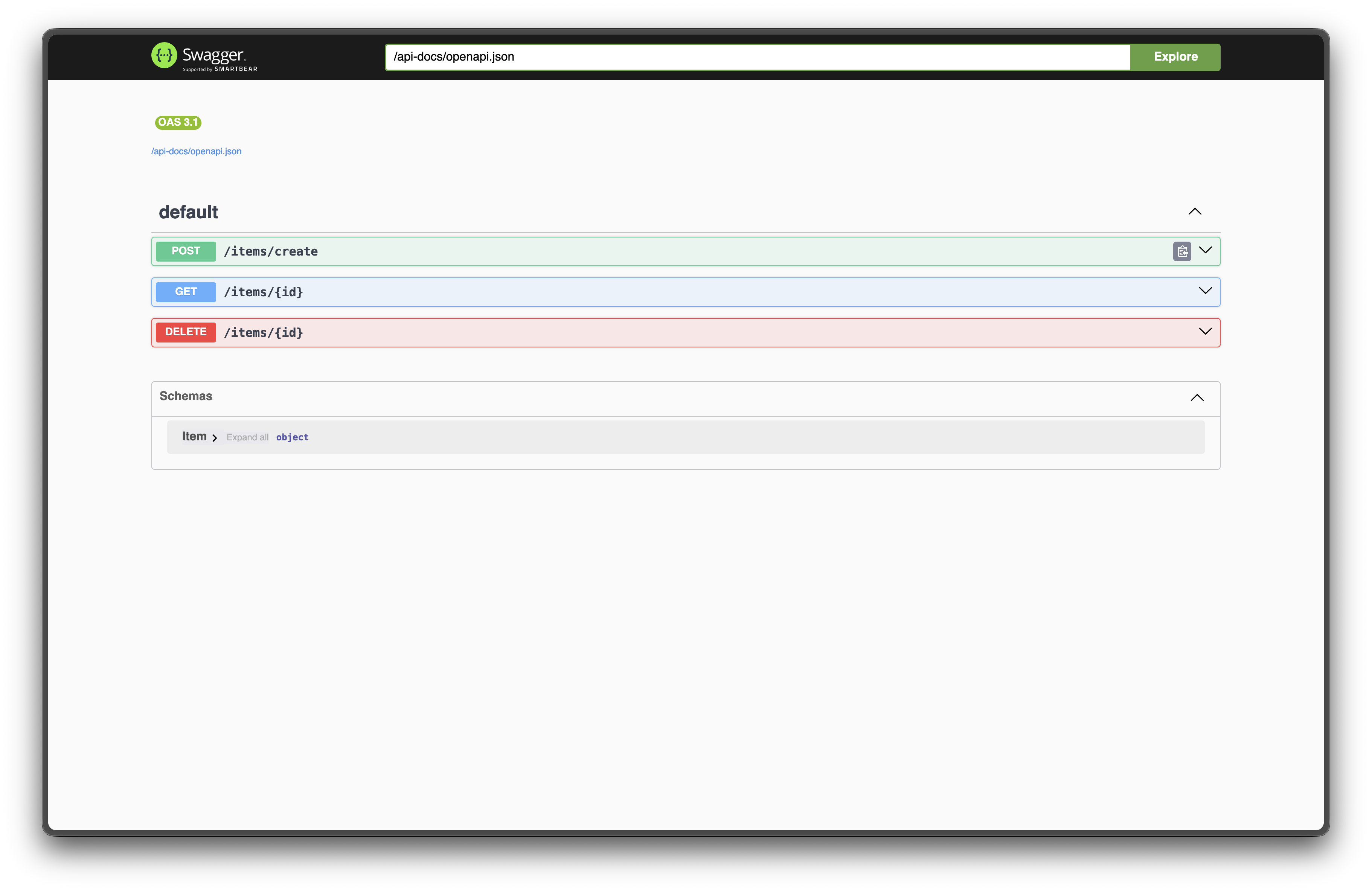
You can start creating new items by interacting the POST /items/create section.
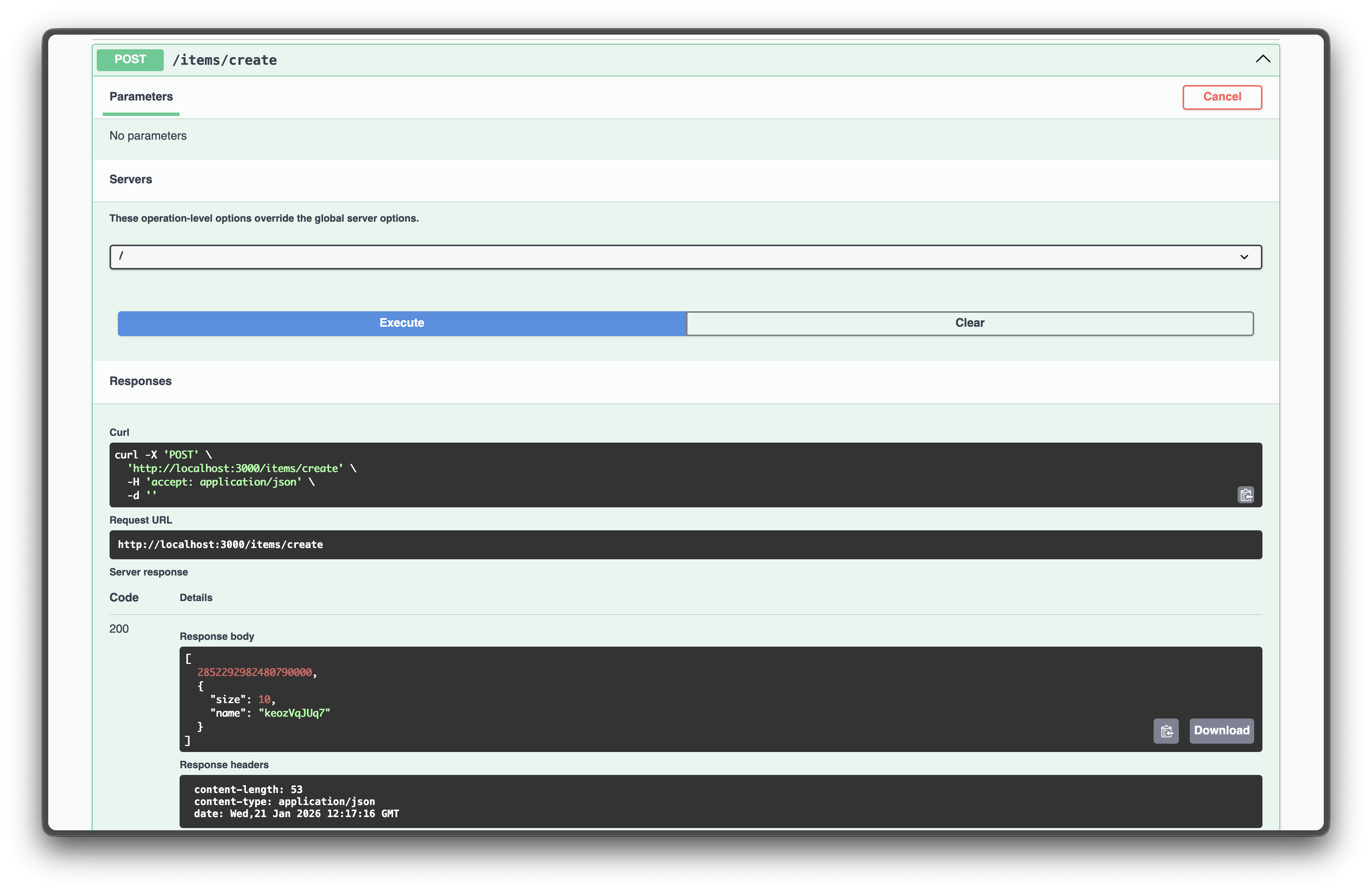
But there is a problem§
You'll notice by now that interacting with the GET /items/{id} with the ID presented by the response you got from POST /items/create gives you a similar response like below
[
  2852292982480790000,
  null
]
You can test this by checking that the IDs do not really match by modifying the create_item method into
#[utoipa::path(post,path= "/create", responses((status = OK, body = (u64, Item))))]
async fn create_item(Extension(app_state): Extension<Arc<AppState>>) -> impl IntoResponse {
    let id: u64 = random();
    println!("Creating item with ID: {}", id);
    let name = generate_random_string(10);
    let size = name.capacity();
    let item = Item { size, name };
    app_state.bucket.insert(id, item.clone());
    Json((id, item))
}
so you can get output like this
    Finished `dev` profile [unoptimized + debuginfo] target(s) in 1.48s
     Running `target/debug/axum-api`
Creating item with ID: 4874131135699964599
The cause of this problem? Javascript.
How to handle large numbers§
Javascript cannot handle numbers that are larger than 9,007,199,254,740,991. To put that into perspective, let's say we set our path parameter as type Path<u64>. Surely enough, Rust can handle that large number but our Swagger UI cannot since it runs on Javascript via web browser.
You can test with the
curlcommand and it should work just fine though oncurl.
To fix this issue, you either change the integer type that can fit the integer limit of 9,007,199,254,740,991 from Javascript e.g. u8 or u32. Another nicer approach is to pass a custom JSON with the id as a string as part of our response which is the most common solution to this problem. Hence, each of our API endpoints should return numbers as a string if we want to preserve its size and length for conversion later in the Rust backend.
#[utoipa::path(post,path= "/create", responses((status = OK, body = (String, Item))))]
async fn create_item(Extension(app_state): Extension<Arc<AppState>>) -> impl IntoResponse {
    let id: u64 = random();
    println!("Creating item with ID: {}", id);
    let name = generate_random_string(10);
    let size = name.capacity();
    let item = Item { size, name };
    app_state.bucket.insert(id, item.clone());
    Json((id.to_string(), item))
}

#[utoipa::path(get, path="/{id}", responses((status=OK, body=(String, Option<Item>))))]
async fn get_item(
    Path(id): Path<u64>,
    Extension(app_state): Extension<Arc<AppState>>,
) -> impl IntoResponse {
    let maybe_item = app_state.bucket.get(&id);
    let item = maybe_item.map(|v| v.clone());
    Json((id.to_string(), item))
}

#[utoipa::path(delete, path="/{id}", responses((status=OK, body=(String, Option<Item>))))]
async fn delete_item(
    Path(id): Path<u64>,
    Extension(app_state): Extension<Arc<AppState>>,
) -> impl IntoResponse {
    let maybe_item = app_state.bucket.remove(&id);
    let item = maybe_item.map(|(_, v)| v.clone());
    Json((id.to_string(),item))
}
You can see here that we have adjusted by calling the .to_string method. You might want to add a method for Item to convert large numbers to strings e.g.
impl Item {
    fn to_javascript_compatible_values(&self) -> serde_json::Value {
        let size_str = self.size.to_string();
        let name = self.name.to_string();
        serde_json::json!(
            { "size": size_str,
               "name": name
            }
        )
    }
}
of which we can now use to further update the API endpoint functions
#[utoipa::path(post,path= "/create", responses((status = OK, body = (String, serde_json::Value))))]
async fn create_item(Extension(app_state): Extension<Arc<AppState>>) -> impl IntoResponse {
    let id: u64 = random();
    println!("Creating item with ID: {}", id);
    let name = generate_random_string(10);
    let size = name.capacity();
    let item = Item { size, name };
    app_state.bucket.insert(id, item.clone());
    Json((id.to_string(), item.to_javascript_compatible_values()))
}

#[utoipa::path(get, path="/{id}", responses((status=OK, body=(String, Option<serde_json::Value>))))]
async fn get_item(
    Path(id): Path<u64>,
    Extension(app_state): Extension<Arc<AppState>>,
) -> impl IntoResponse {
    let maybe_item = app_state.bucket.get(&id);
    let item = maybe_item.map(|v| v.to_javascript_compatible_values());
    Json((id.to_string(), item))
}

#[utoipa::path(delete, path="/{id}", responses((status=OK, body=(String, Option<serde_json::Value>))))]
async fn delete_item(
    Path(id): Path<u64>,
    Extension(app_state): Extension<Arc<AppState>>,
) -> impl IntoResponse {
    let maybe_item = app_state.bucket.remove(&id);
    let item = maybe_item.map(|(_, v)| v.to_javascript_compatible_values());
    Json((id.to_string(), item))
}Conclusion§
You can see the full result in the following video below
The full repository can be found here.